 BotStable
Free hosting for Discord bots
BotStable runs your Node.js or Python bot on a server, so it stays online when your own PC is off. It's free, no card needed.

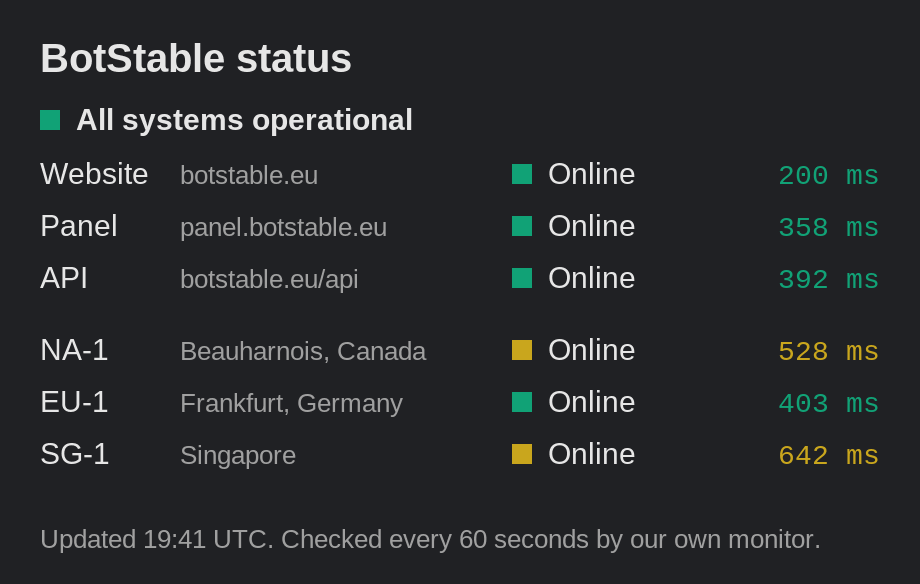
Is it up right now?
This picture is made by the site from our monitor's data and updates every minute. Click it for the full size.
History, incidents and the daily report are on the status page.
Getting an account
It's a hobby project and I run it on my own, on three small VPS nodes. Accounts are made by hand, so it isn't instant: someone has to read your ticket first.
Join the Discord
Everything starts in the BotStable Discord.
Open a ticket
Say what your bot does and whether it's Node.js or Python.
Get a panel login
You get login details for panel.botstable.eu.
Upload and start
Upload your files, add your bot token and press Start.
Limits, what's included and what isn't allowed are on How it works.
What every bot gets
The same for everyone. It's enough for most bots: moderation, tickets, logging, small games.
The CPU cap only makes a busy bot slower. Above 256 MB of memory the bot can be stopped, and the console shows you why.
- Memory
- 256 MB
- CPU
- 25% of one core
- Disk
- 1 GB
- Languages
- Node.js, Python
Locations
Three nodes on three continents.
| Node | Location | Status | Latency |
|---|---|---|---|
| NA-1 | Beauharnois, Canada | Checking | |
| EU-1 | Frankfurt, Germany | Checking | |
| SG-1 | Singapore | Checking |
Latency is measured by our own monitor. It's how fast the node answers the monitor, not your ping to it.
Where we run
- NA-1, Beauharnois, Canada, status unknown
- EU-1, Frankfurt, Germany, status unknown
- SG-1, Singapore, status unknown
- Host
- Checker
- ≤450 ms
- ≤700 ms
- ≤1500 ms
- >1500 ms
- Down
- Maintenance
- No data
Each dot is a node, colored by its status and latency. Same ranges as the status site.
Is it really free?
Yes. It's a hobby project, there's nothing to pay and you don't need a credit card.
Why do I have to open a ticket?
Accounts are made by hand. That keeps most of the spam and abuse out, and you can ask questions while your account is being set up.
Which languages work?
Node.js and Python. discord.js, Eris, discord.py and Pycord all work, and so do most other libraries.
What happens if my bot goes over the limits?
CPU is capped at 25%, so a busy bot just runs slower. Memory is different: above 256 MB the bot can be stopped. Check the console, fix whatever is using the memory and start it again from the panel.
Can I host something that isn't a Discord bot?
No. Discord bots only. No websites, game servers or crypto miners.
Can I see my bot's logs?
Yes. The panel has a live console with everything your bot prints.
Do I have to renew my server?
Yes. A server runs for 5 days at a time. In the last 48 hours you can renew it on the renew page with your Discord login, and the clock resets to 5 days. If it runs out it is suspended, not deleted, and you have 7 days to renew it before it may be deleted.
Is there an uptime guarantee?
No. It's one person and a few VPS nodes. I try hard to keep them up, and the status page shows how that's going, but there's no SLA.